In short
- The hub produces a remediation plan and never applies it. A pull request carries that plan to a person.
- The merge is the approval and the trigger. Your own runner then executes the plan with the DataAgent CLI, inside your environment, under your credentials.
- Between merge and execution the plan is read again and compared with the approved one. If the plan id moved, nothing runs.
- The executor is deterministic: an allowlist of reversible commands, one namespace, no model, no delete.
- Write access never goes to DataAgent, not on day one and not after a hundred successful runs. What changes with experience is whether a plan waits for a person, not who holds the key.
In this guide
One product, and the part of it this guide is about
DataAgent is a loop, not a feature. It detects, models what is running and what changed, correlates, reasons to a root cause, decides whether a person must approve the fix, hands the fix to your own pipeline, verifies and learns. This guide is the right-hand half of that loop.
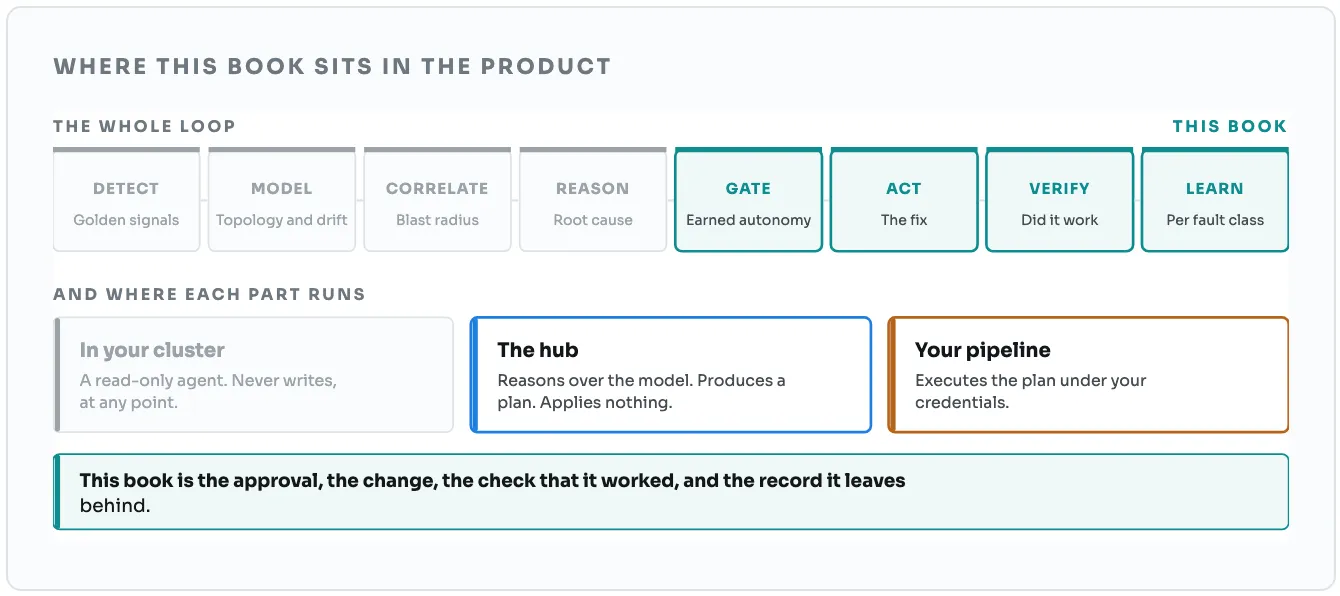
The four stages to the left are the subject of other guides: whether you would see a fault at all, and what the agent watches inside the cluster. This one picks the story up at the moment there is a correct diagnosis and a plan, and the only question left is whether anyone is going to apply it.
↑ Back to topA plan nobody applied is just a very good report
An agent that diagnoses correctly and stops has moved the work, not removed it. Someone still has to read the finding, decide, and type the commands. The interesting question is not whether the agent can act. It is who is accountable when it does.
The plan, proposed forever
Status proposed. Confidence 95. Risk low. Five steps, each one a real command. And then nothing, because the decision to apply it is local, and no vendor should be making it for you. The work has moved, not gone.
The plan, approved and applied
A pull request a named person reviewed and merged, at a recorded time. Your runner executed it, watched the rollout, and reported the verdict. The incident closed itself. The loop is shut.
There is a reason the hub leaves the plan at proposed. Applying a change to production is a decision with a blast radius, a change window, a compliance story and an on-call rota attached to it. All of those live on your side. A product that reached across that line to press the button would be solving the easy half of the problem and creating a worse one.
So the approval has to live somewhere real
Three things an approval needs to be worth anything six months later, when somebody asks why a deployment was rolled back on a Tuesday night.
One: attributable
A named person, at a recorded time, against a specific version of the plan. A chat message does not survive the next workspace migration, and an approval with no name on it has nobody to ask.
Two: specific
Approval of this plan, not of the agent in general. If the plan changes between the approval and the run, what was approved is no longer what would run, and the right behaviour is to stop.
Three: on a surface you already trust
Not a new console with its own permission model to reason about. The approval should sit where your changes already get reviewed, with the access rules you already run.
Which is a long way of saying: a pull request.
The rest of this guide is one way to build that, taken from a working reference implementation rather than a design. Where it has rough edges, section 10 says so.
Questions this section answers
- Is this the only way to approve a remediation?
- The pull request is the only route a change takes. A button in a console or on a project board only submits a review and merge on that same pull request, and for an SRE on call that is often faster. Either way the audit trail is the one you already keep.
- Does DataAgent need write access for any of this?
- No. Otto, our agent in your cluster, stays read-only and the hub applies nothing. Your own runner makes the one write, under your credentials. Section 8 has the detail.
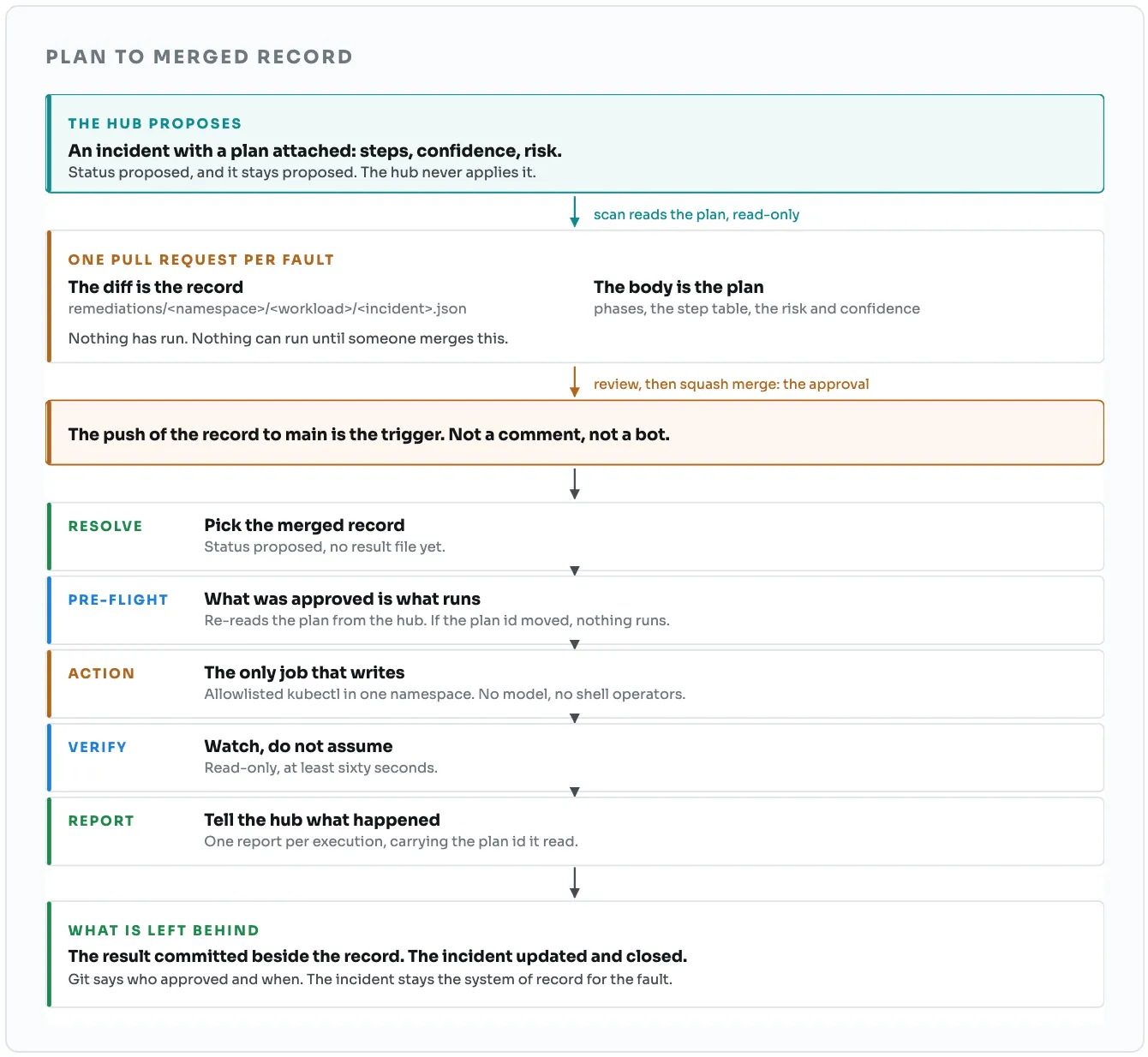
Plan, pull request, merge, run, record
Five moves, and only one of them writes to your cluster. The merge is the only trigger, and everything downstream of it is a job you can read on your own CI's run page (the Actions tab on GitHub).
Why the merge, and not a button
The design decision that everything else follows from is that the trigger is a push to the default branch touching the records directory. Not a comment, not a chat command, not a webhook from the product.
That has three consequences worth stating plainly, because they are the reasons to prefer this over something that looks friendlier.
The approval and the trigger are the same event
There is no gap between a person saying yes and the thing starting, and therefore no second system that has to be trusted to carry the yes across. The merge commit is both the authorisation and the start signal.
The audit trail is one you already keep
Not a log in a product you may not renew.
git logis the record of what was approved,git blamesays who approved it, and both outlive the vendor relationship.Your existing controls apply without being re-implemented
Required reviewers, CODEOWNERS, branch protection, environment gates. None of that had to be built here, because the approval is an ordinary pull request and those rules already govern it.
Questions this section answers
- What triggers the scan that opens the PR?
- On demand: a button in the Actions tab, a script, or a dispatch event. In our test environment it also fires after a test fault is injected, so the pull request appears within about a minute. There is no cron.
- What if there is no plan, or the plan says do nothing?
- No pull request is opened. A no-action plan is logged and left alone, because a PR that proposes nothing is noise that trains people to merge without reading.
The pull request is the record, not a notification
The diff is a file describing the fault and the plan. The body is that plan drawn out, with its phases and steps. Reviewing the PR is reviewing the change, because the PR is the change.
What is actually in the diff
One file per fault, at a path that says what it is about without being opened:
remediations/<namespace>/<workload>/<incident-id>.jsonIt carries the incident as the hub saw it, and the plan as the hub proposed it: the steps, the confidence, the risk, and the plan id. A real one from our test environment, for a checkout deployment stuck in ImagePullBackOff, scored confidence 95 and risk low, with five steps. It came from a separate run of the same checkout fault shown in the DataAgent Live Demo, where the plan had three steps.
That shape is worth noticing. Only the second step changes the cluster. The first exists so the change is not applied to a system that already moved on, and the last three are the difference between an action and a fix.
And what is in the body
The same plan, rendered for a human who has thirty seconds: the phases drawn as a flow, then a table of steps with what each one does. A reviewer should be able to decide from the body alone and open the diff only if something looks wrong.
If a reviewer has to go and find the plan somewhere else, the pull request is a notification, not a record.
What happens if the plan changes
Plans are not frozen. The hub may revise one as the incident develops, and a later scan will find a different plan id against the same fault. When that happens the existing record and PR body are updated in place rather than a second PR being opened, so there is one pull request per fault and its current state is the current proposal.
The approval therefore attaches to a specific version of the plan, which is what makes the pre-flight check in section 5 possible at all.
Questions this section answers
- Why one PR per fault rather than one per plan revision?
- Because a reviewer is deciding about a fault, not about a document. Several open PRs for the same broken workload is the kind of thing that gets merged carelessly.
- Does the record contain anything sensitive?
- It contains the incident and the plan: namespace, workload, resource names and the commands proposed. No telemetry, no logs, no secrets. It lives in your repository under your access rules.
Where a person actually approves
Three surfaces, one merge. A console tab for someone who lives in a console, a project board for someone who lives in tickets, and the pull request itself for someone who lives in git. All three end in the same review and the same squash merge.
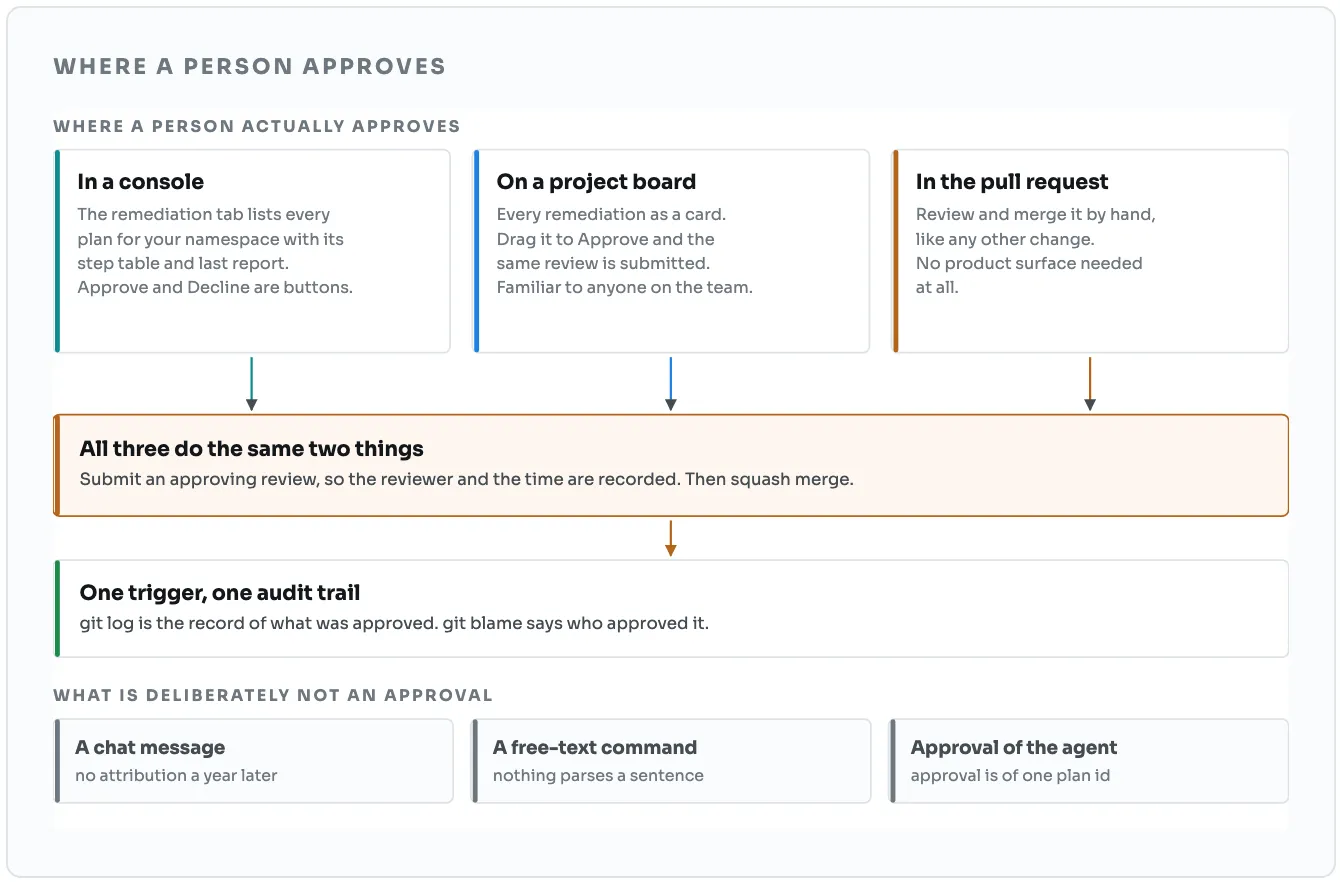
The console tab, in detail
In the reference implementation this is a remediation tab in a small web app, and it is deliberately thin. It lists the open remediations for your namespace, newest first: the fault, the plan as a step table, the status, and the last report if the plan has already run. Two buttons, Approve and Decline, and a Scan now for when you want to look before waiting.
What Approve does
Submits an approving review naming the person who pressed it, then squash merges. The tab is not a second approval mechanism. It is a front end onto the same pull request. Someone auditing later sees the same review they would see if the button had never existed.
What Decline does
Closes the pull request without merging, and the scan treats that as a decision: it will not reopen the same plan for the same fault. A revised plan is a new proposal and gets a fresh look.
What it refuses to show you
Anything outside your own namespace. The tab filters on it and the approve and decline routes check it again, so a request naming someone else's remediation is answered with a not-found rather than an error that confirms it exists.
What runs after the merge, in order
Four jobs after the record is resolved, each one a separate step you can watch. The ordering is the safety model: nothing writes before the plan has been checked, and nothing is reported before the result has been watched.
- Resolve
- Pick the merged record. Find the record this push added, confirm its status is still proposed and that no result file sits beside it. A re-run of the same merge does not act twice.
- Pre-flight
- Read-only, and the one that can refuse. It runs four checks, set out in section 5. If any fails, nothing runs.
- Action
- The only job that writes. Runs the plan's act and check steps, stopping at the first failure. It sits behind its own environment, so a second reviewer can be required here and nowhere else.
- Verify
- Read-only again. Watches the result for at least sixty seconds before calling it a success.
- Report
- Tell the hub, then write it down. Section 7 lists what is left behind and where.
Splitting these into separate jobs is not tidiness. It means the write step has its own identity, its own permissions and its own approval gate, and that the read steps on either side of it cannot change anything even if they are wrong.
↑ Back to topWhat was approved is what runs, or nothing runs
The check that makes the approval mean something. Between a person pressing merge and the first command executing, the plan is read again from the hub and compared with the plan that was approved.
Why this check has to exist
An incident is a live thing. Between the moment a plan is proposed and the moment someone gets round to reviewing it, the hub may have learned more and revised it. If the run simply executed whatever the hub currently holds, then the approval would be an approval of the agent in general rather than of a specific set of commands, which is the exact failure this design exists to avoid.
So pre-flight re-reads the plan and compares ids. If they differ, nothing runs and the pull request says why. Somebody has to look again.
A gate that cannot refuse is not a gate.
What the operator sees when it refuses
The run stops at pre-flight, the pull request gets a comment saying which of the four checks failed, and the commit status goes red. Nothing was touched. The useful property is that a refusal looks exactly like a failure in any other pipeline, so it reaches people through channels they already watch.
This is also where the design pays for the decision to run each phase as its own job. A reviewer looking at the Actions page sees pre-flight red and action never started, which is unambiguous. A single job that logged its way to the same conclusion would need reading.
Questions this section answers
- What if someone merges a very old record?
- Pre-flight catches it. The plan id in the record will not match what the hub holds, or the plan will no longer be proposed, and the run stops before the write step.
- Can the run be forced past a failed pre-flight?
- Not from inside the workflow. The remedy is to scan again, which refreshes the record with the current plan, and approve that. Which is to say: look at it again.
- Why three attempts?
- Because a fix that has failed three times since the incident reopened is not a fix. The number is a configuration choice; having a ceiling at all is the point.
- Does every change wait for a person?
- Autonomy is earned per fault class: recommend only, then approve first, then autonomous, on a verified record. Until a fault class has earned it, a person approves each change. Once it has, the merge no longer waits for a person, but the change still runs in your repository, on your runner, under your credentials.
What it is allowed to run, and what it refuses
The action job is deterministic. It runs the commands the approved steps carry, against an allowlist, in one namespace, with no model in the loop. The interesting part is the list of things it will not do.
The allowlist
Reads, and a small set of writes that are all reversible:
kubectl get | describe | top | wait | rollout status | rollout undo
kubectl rollout restart | set image | scale | patch deployment | patch statefulset
aws ecr describe-images
That is the whole surface. Rolling back a deployment, restarting it, scaling it, changing an image tag or patching a workload. Every one of those is a thing you could undo in a minute by hand, which is the test for whether it belongs on this list.
Note what is not on the refusal list: delete. It is not there because it never reaches the list, having never been on the allowlist in the first place. Nothing in this path deletes anything.
Why no model at the point of action
A reasonable objection: the plan came from a model, so why insist the execution is deterministic? Because they are different risks at different moments.
Reasoning to a plan is a judgement problem, and a model is good at it. Turning an approved plan into commands is not a judgement problem at all. Putting a model there adds a second place where behaviour can vary between the thing a person approved and the thing that ran, and the approval was of the plan.
The model proposes. The approval decides. The executor obeys, narrowly, and refuses anything it was not handed.
Some teams will ask for a model at this step. We do not put one there, for the reason in this section.
Questions this section answers
- What if the plan proposes something outside the allowlist?
- The step fails and the run stops there. The pull request comment names the refused command. That is a useful signal about the plan rather than an obstacle to it.
- Can I widen the allowlist?
- Yes, it is a script in your own repository. Widen it deliberately, and remember that every addition is something a future plan may propose at three in the morning.
Verify, and then the incident becomes the record
The run does not end when the command succeeds. It ends when something has watched the system settle, and the hub has been told what happened. The incident is then the place that remembers.
Verify watches, it does not assume
A command exiting zero means the API accepted it. It says nothing about whether the rollout completed, whether the new pods stayed up, or whether the symptom cleared. So verify runs the plan's verify steps, or watches the incident target if the plan named none, for at least sixty seconds.
The floor matters more than it looks. A pod that starts and crashes again forty seconds later is the single most common way an automated fix reports success and leaves an outage running.
Then the report, and what it carries
One report per execution, sent to the hub with a post-flight verdict and the plan id it read at pre-flight. That last detail is what stops a report attaching to a plan nobody looked at.
Three places sounds like duplication and is not. The hub holds it because the next decision about this fault class depends on it. Git holds it because that is the audit trail. The pull request holds it because that is where the person who approved it is looking.
↑ Back to topWho holds which key
The argument of this entire guide in one figure. DataAgent holds the incident, the plan and the verdict. You hold every credential that can change anything.
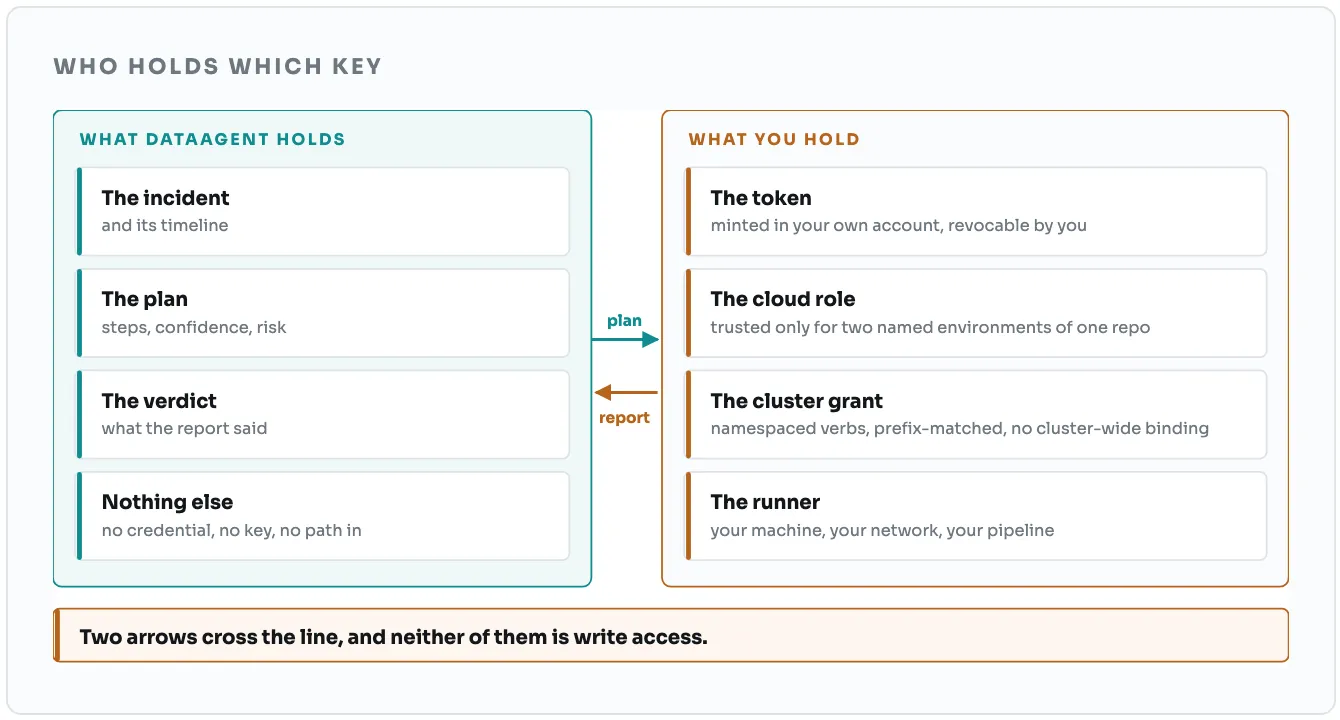
Everything the runner uses is a secret you minted: a client token from your own organisation, a cloud role you created, a cluster grant you applied. Revoking any of them is something you do without telling anyone.
Otto, our agent in your cluster, is on the DataAgent side of this line and stays read-only for its whole life, at every autonomy level. The DataAgent CLI has no interactive command that changes a cluster. Its remediate command only fetches the plan.
How narrow the cluster grant actually is
Worth spelling out, because "read-only plus a bit" is the sort of claim that should come with the verb list.
Reads
get,listandwatchon pods, events, services, endpoints, deployments, replicasets, statefulsets and autoscalers.Writes, and this is the complete list
patchandupdateon deployments, statefulsets, and their scale subresources. Nothing else. No secrets, no config maps, no role bindings, no deletes, nothing cluster-scoped.And only in the right namespaces
The grant follows a namespace prefix rather than a list of names, which matters when namespaces are created on demand. It is a cluster role with namespaced verbs, bound into each matching namespace separately. There is deliberately no cluster-wide binding, so the system namespaces are out of reach by construction rather than by policy.
And the identity the cloud trusts
The cloud role trusts the pipeline only for two named environments of one repository. One has no reviewers and admits the read-only jobs; the other carries the reviewer gate and admits only the job that writes. A workflow in another repository, or the same repository outside those environments, cannot assume it.
Questions this section answers
- What can someone do if the token leaks?
- The token is yours and scoped to your organisation. It reads incidents and plans and posts reports. It cannot reach your cluster, because nothing about cluster access comes from the hub.
- What stops the pipeline being used to run something else?
- Three independent limits, not one: the cloud role, the namespaced cluster grant, and the executor's allowlist.
How to build this on your own stack
Everything in this guide uses the DataAgent CLI, a token from your own organisation and your own CI. There is nothing internal in the path, which means a platform team can rebuild it without asking anyone.
What you need before you start
- A repository
- Where the records will live. It can be an existing one. The workflow only ever writes under a single directory, so it does not have to be a repository of its own.
- A token
- Minted in your own organisation with the DataAgent CLI's token command. Used by the scan to read incidents and by the report job to post verdicts. Stored as a CI secret, never on disk.
- A runner
- Anything that can reach your cluster. A self-hosted runner on a machine you control is the straightforward choice, because the cluster usually is not reachable from a hosted one.
- A cloud role
- Assumed by the pipeline through federated identity, trusted only for the specific environments that need it. No long-lived cloud keys anywhere.
- A cluster grant
- The namespaced role and bindings from section 8. This is the one a human applies once, and the one to review carefully.
The five stages, and what to prove at each
- Stage 01
Scan only
Token, scan workflow, no runner. Plans arrive as pull requests. Merge nothing. Prove the plans are sane before anything can apply one.
- Stage 02
Read-only run
Add the runner and the role, but with the action job disabled. Pre-flight and verify run against a merge. Prove identity and plan matching work.
- Stage 03
One class, one namespace
Enable the action job for a single fault class in one non-production namespace. Something frequent, boring and reversible.
- Stage 04
Inject it on purpose
Break that thing deliberately and watch the whole chain. This is the step teams skip and the only one that actually tells you anything.
- Stage 05
Widen, slowly
A class at a time, a namespace at a time, with the record from the previous stage as the argument for the next. A class that has earned autonomy can then merge without waiting for a person.
Choices you will have to make, and the way we would lean
Where the records live. In the repository that already owns the workloads, if there is one. The reviewers you want are already watching it.
Who can approve. Start narrower than feels necessary. Branch protection and required reviewers on the records directory cost nothing and are hard to add later once people are used to merging freely.
Whether to require a second reviewer on the write step. Yes, at first. The environment gate makes this one setting, and it is the cheapest way to make the first few real runs comfortable for everyone watching.
Things that will bite you, from doing it
The namespace grant, if namespaces are created on demand
A binding per namespace does not exist yet for a namespace that does not exist yet. The reference implementation solves it with a small job that keeps bindings in step with a namespace prefix, and a new namespace is covered within a minute. If your namespaces are long-lived and named, you do not need any of that.
The merge does not look like it belongs to the pull request
The run starts from a push, and the platform does not tie that push back to the pull request for you. The workflow has to do it itself: comment the run link on the PR as soon as it picks up the record, and set a commit status so the result shows in the checks box after the merge. Worth building early, because without it the run is invisible from where people are looking.
Approval events are not a reliable trigger
Review events behave differently from push events, and in our testing they never started a run. Treating the merge as the single trigger avoids the whole category. Every approval path should end in a merge rather than trying to act on the review itself.
Page size on the incident list
Filtering a page of recent incidents on the client works on a quiet estate and silently misses rows on a busy one. Filter server-side where the API lets you, and know which of the two you are doing.
Questions this section answers
- How long does this take to stand up?
- The scan and the pull requests, an afternoon. The role, the grant and a runner you are happy with, longer, and most of that is your own review rather than the work.
- Do I need the console tab, or the project board?
- No. Both only submit a review and merge on the same pull request. Merging by hand is a complete implementation of the approval step.
What this does not do
A reference implementation with its rough edges named, because a guide that only lists what works is not much use when you are deciding whether to build something.
- It is not the fastest surface
- For an SRE on call, a button is quicker than opening a pull request, and section 3 shows two. Both still end in the same merge on the same pull request. This shape suits a change that can wait minutes rather than seconds.
- Enforcement depends on your Git hosting tier
- Required reviewers and environment gates only block a merge where your hosting tier supports them. Check yours before you rely on them. Where they are not enforced, a collaborator can merge a record unreviewed. The pull request still records who merged and when, but recording is not preventing, and the difference matters.
- The action surface is small on purpose
- Rollbacks, restarts, scaling, image changes and workload patches. A fault whose fix is a cloud permission, a security group or a database change is out of scope for this path, and should be.
- It assumes the plan is good
- Everything here is about making the approval real and the execution narrow. None of it makes a wrong diagnosis right. That is what the coverage work and the injected-fault record are for, and they are a different guide.
Every one of these is a boundary rather than a bug. A system that could do all of it would be one nobody could reason about.↑ Back to top
So is it worth building?
Worth it if the answer to "who approved this" has to survive a year. Build the read-only half regardless, because it costs an afternoon and commits you to nothing.
The honest position is that the approval step is not hard engineering. What is hard is deciding where the approval lives, and that decision outlives whichever agent you are evaluating this quarter. A pull request is a good answer because it is already how your changes get reviewed, and because nobody has to be persuaded to trust it.
Two conditions, both cheap to test before committing.
Check that a plan is worth approving. Run the scan, read ten plans, and do not merge any of them. If the plans are good, the rest of this is plumbing. If they are not, no approval mechanism saves you and you have learned that cheaply.
Then break something on purpose and watch the whole chain. Not a demo of the workflow succeeding. A fault you injected, in a namespace you own, going all the way to a closed incident. Everything before that is a design review.
↑ Back to top