In short
- A deployment went out with an image tag that does not exist in the registry. About 90 seconds later the cause was named, the evidence attached and a three-step plan written at 95% confidence, with every step marked reversible.
- Nobody was paged, and no change was made to the cluster without approval: no DataAgent component holds write credentials to the cluster.
- The plan becomes a pull request in your repository, a person approves it, and your own runner applies it with the DataAgent CLI under your credentials, then verifies and reports back.
- The interesting runs are the ones that stop: a declared gap, a refused pre-flight, a hand-back to a human, a step refused by policy, or no plan at all.
- Running it yourself takes three pieces, and two of them you already have.
In this guide
Nobody was paged. The answer was already written.
A deployment went out with image tag v2.1.0-hotfix-broken, which does not exist in the registry. The pod could not pull it. The rollout stuck.
~90 sec
from the bad rollout to a written root cause with evidence attached
95%
confidence on a three-step plan, every step marked reversible
0
people woken up, and no change made to the cluster without approval
What it worked out on its own
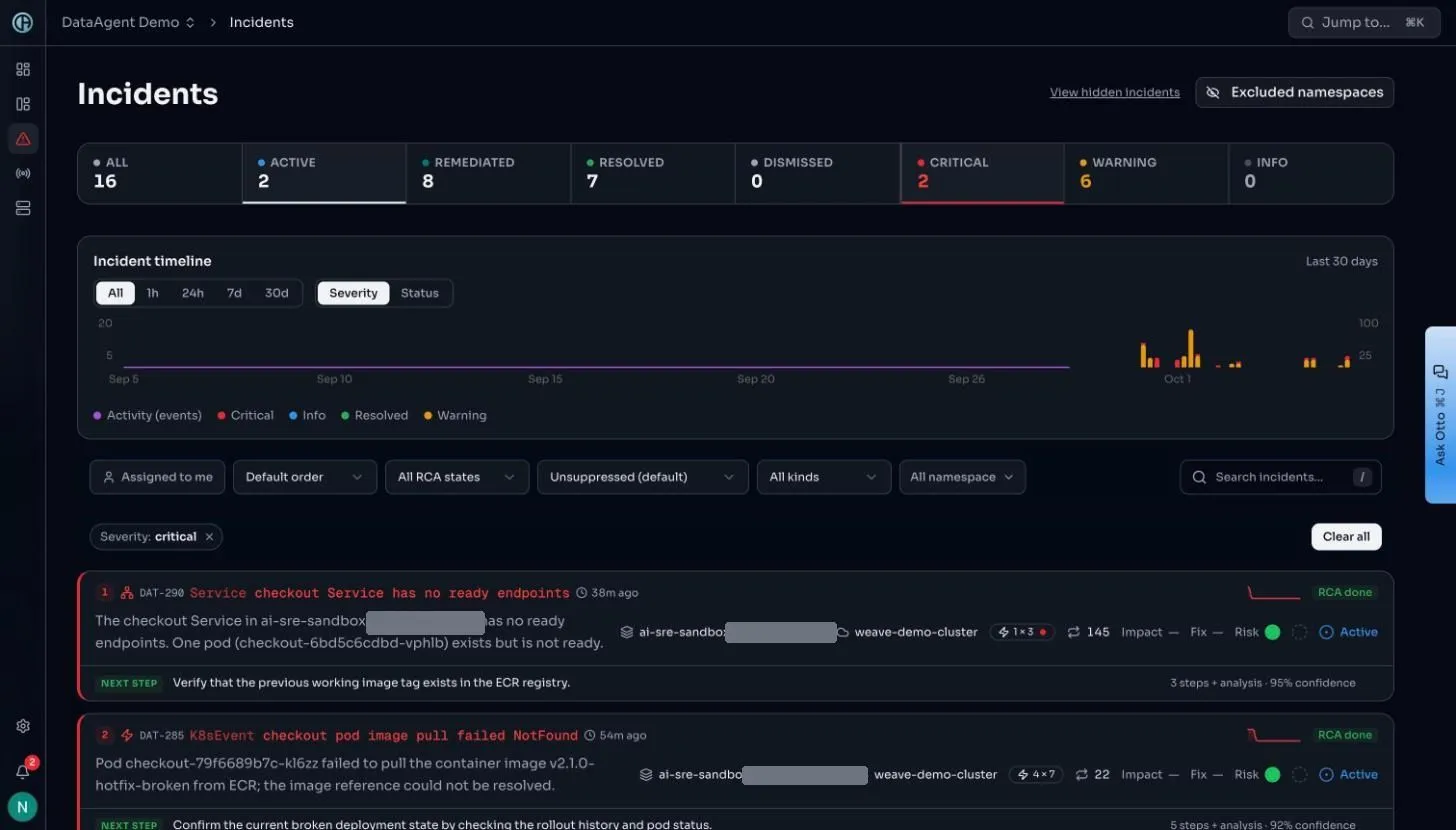
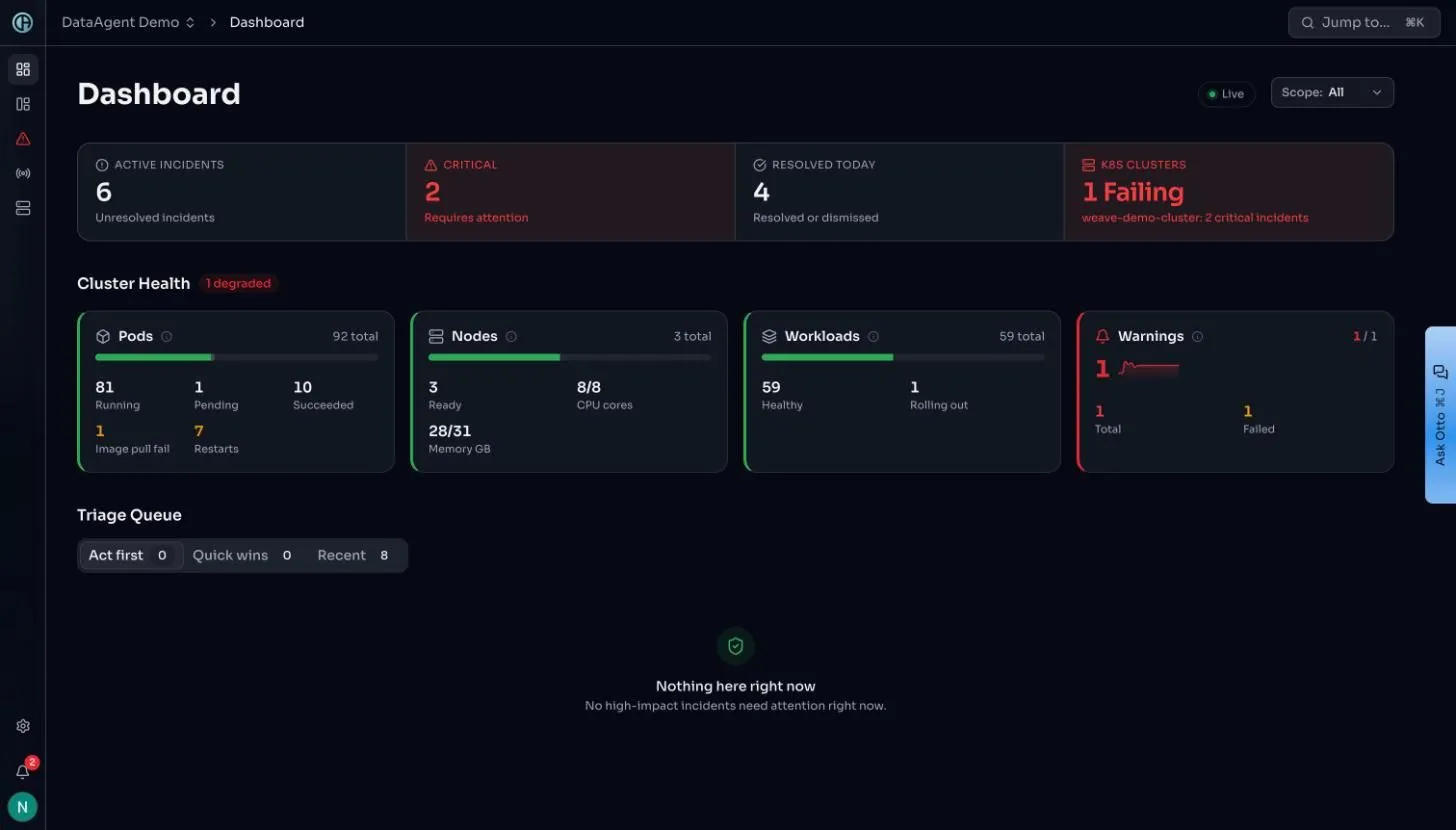
Two incidents, one cause, raised 16 minutes apart as the second rollout attempt repeated the first.
The work of triage had already happened. What was left was a decision.↑ Back to top
Five screens, then the route to production
Each screen answers the question the one before it raises.
- Stage 01
It appears: Detection
Raised, classified and scored without anyone asking.
- Stage 02
It explains: Analysis and evidence
The cause, and every source it was read from.
- Stage 03
It scopes: Topology
What else is downstream of the thing that broke.
- Stage 04
It proposes: A plan
Exact commands, risk and reversibility per step.
Two questions worth holding
- Would my monitoring have caught this? Only as a symptom. Request metrics show traffic falling, not why. Screen 3 shows what was actually wrong.
- How did it know? Nobody told it. Screen 3 lists every source it read, including the rollout history that names the exact revision.
The incident, screen by screen
Five screens. The line at the bottom of each says what it settles.
Screen 1: Raised, scored and classified (T+0)
Notice what is not here: a severity to triage by hand, a runbook to look up, a link to a dashboard. The row carries the conclusion. 145 signals collapsed into this one incident, which is the fault-class grouping doing its job.
Where to look
- RCA done
- The analysis ran before anyone looked.
- Signal count
- 145 signals, one incident.
- Next step
- In plain language, not a severity level.
Screen 2: It names the cause (T+90s)
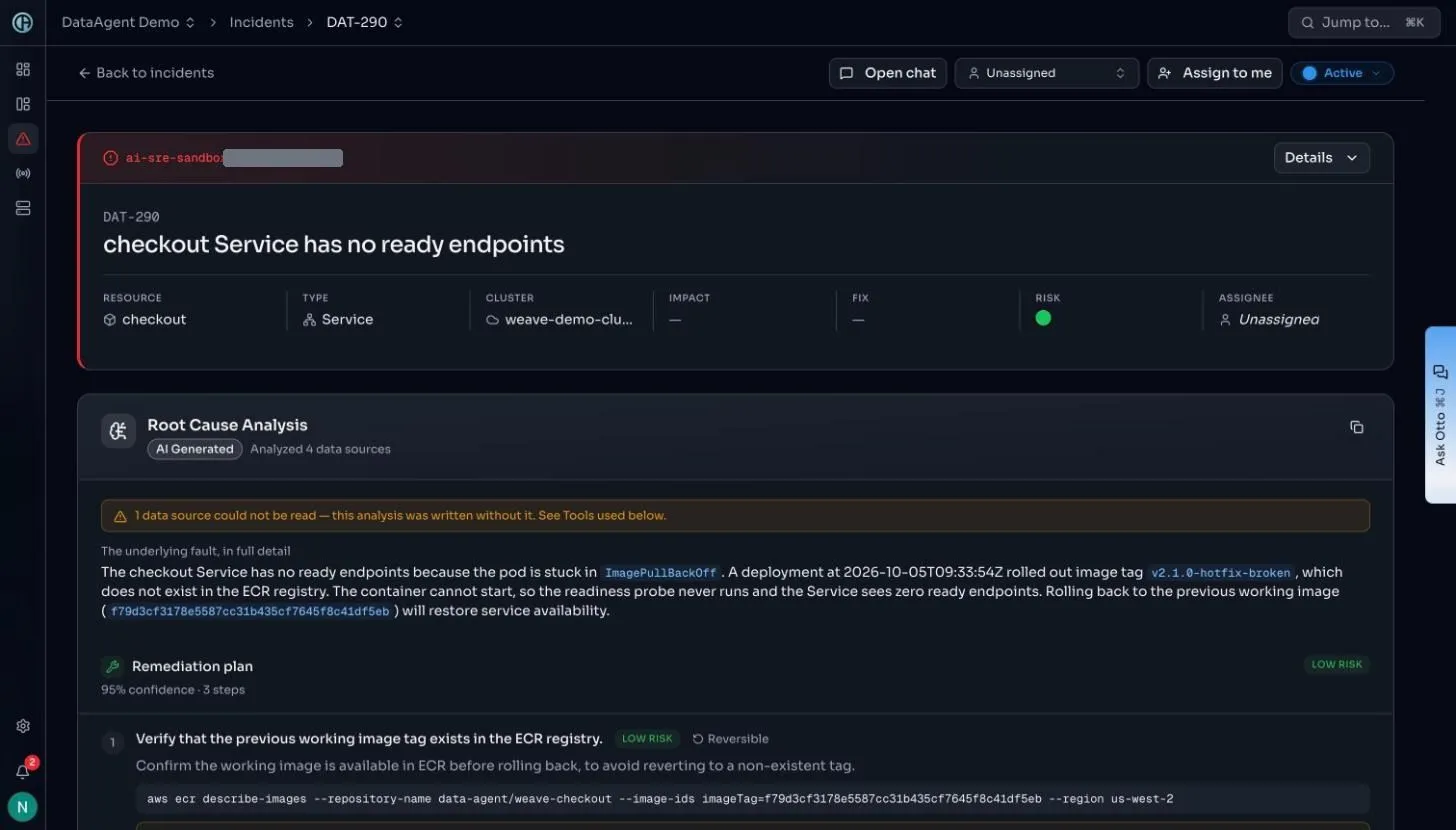
It names the exact tag that does not exist, the timestamp of the rollout that introduced it, the working image to go back to, and the chain of consequence: cannot pull, so the container cannot start, so the readiness probe never runs, so the Service has zero endpoints. Then the remediation plan at 95% confidence, directly underneath.
Where to look
- The honest note
- One source unavailable, declared at the top.
- The chain
- Pull fails, container waits, probe never runs, endpoints empty.
- The fix
- Named by image digest, not described vaguely.
Screen 3: It shows its working (evidence)
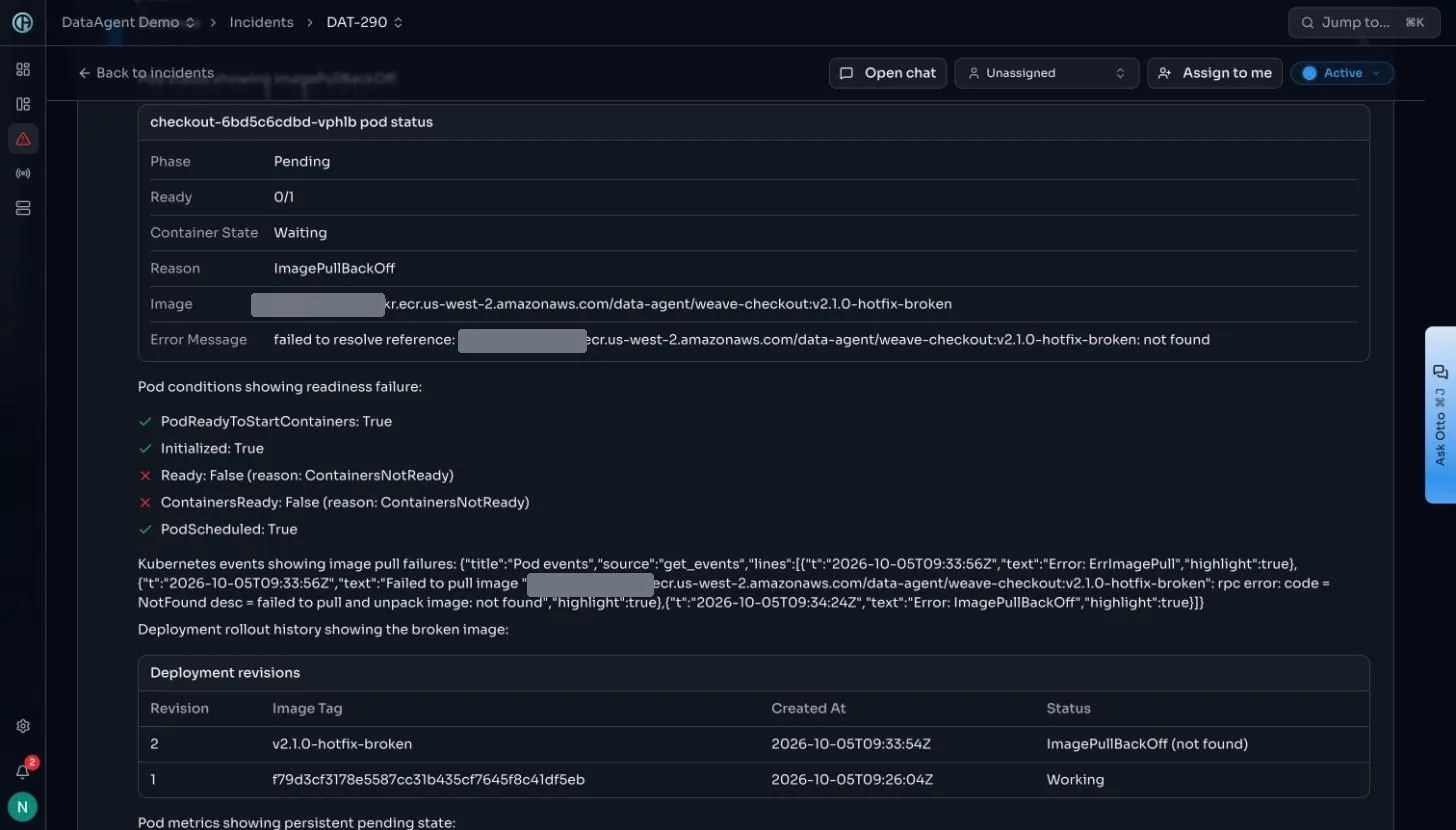
The revision table at the bottom is the whole case in four rows. Revision 2 carries v2.1.0-hotfix-broken and is in ImagePullBackOff. Revision 1 carries a digest and is marked Working. That is the change trail, and it is why the plan can say exactly what to roll back to instead of guessing.
Where to look
- Pod status
- Pending, 0/1, with the full image reference (account number masked) and the resolve error.
- Conditions
- Ready false, ContainersNotReady, but PodScheduled true.
- Revisions
- Revision 2 broken, revision 1 working. The change trail.
Screen 4: It scopes the damage (topology)
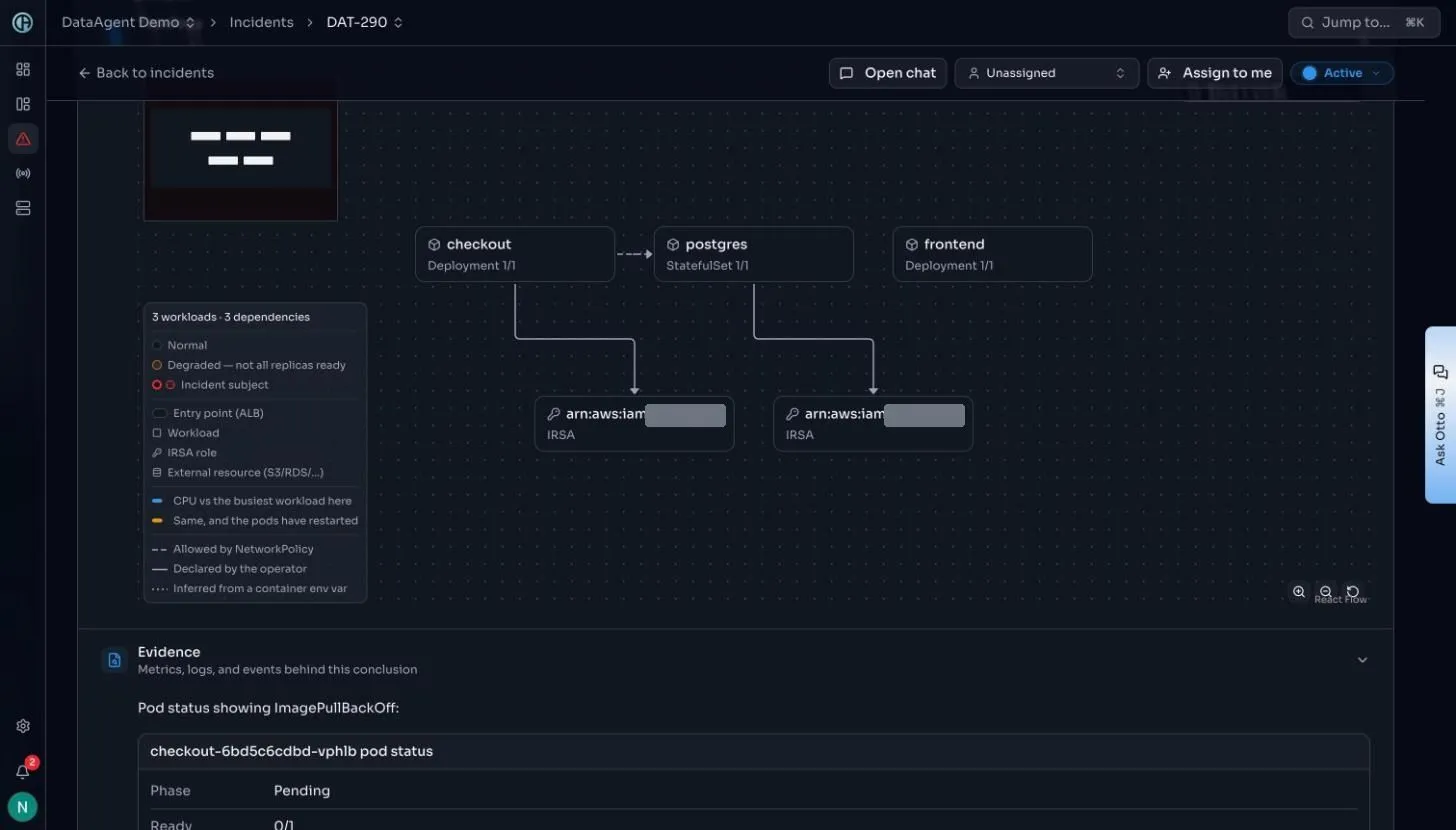
Small estate, small map, and that is the point: the map is derived from this namespace live, not pulled from a static service catalogue someone forgot to update. Checkout depends on postgres, and both carry IRSA roles. The legend distinguishes edges declared by the operator from edges inferred from a container environment variable.
Where to look
- The subject
- Checkout, ringed as the incident subject.
- The dependency
- Postgres, and the IRSA roles behind both.
- Edge types
- Declared by the operator, or inferred from an env var.
Screen 5: It writes the fix (plan)
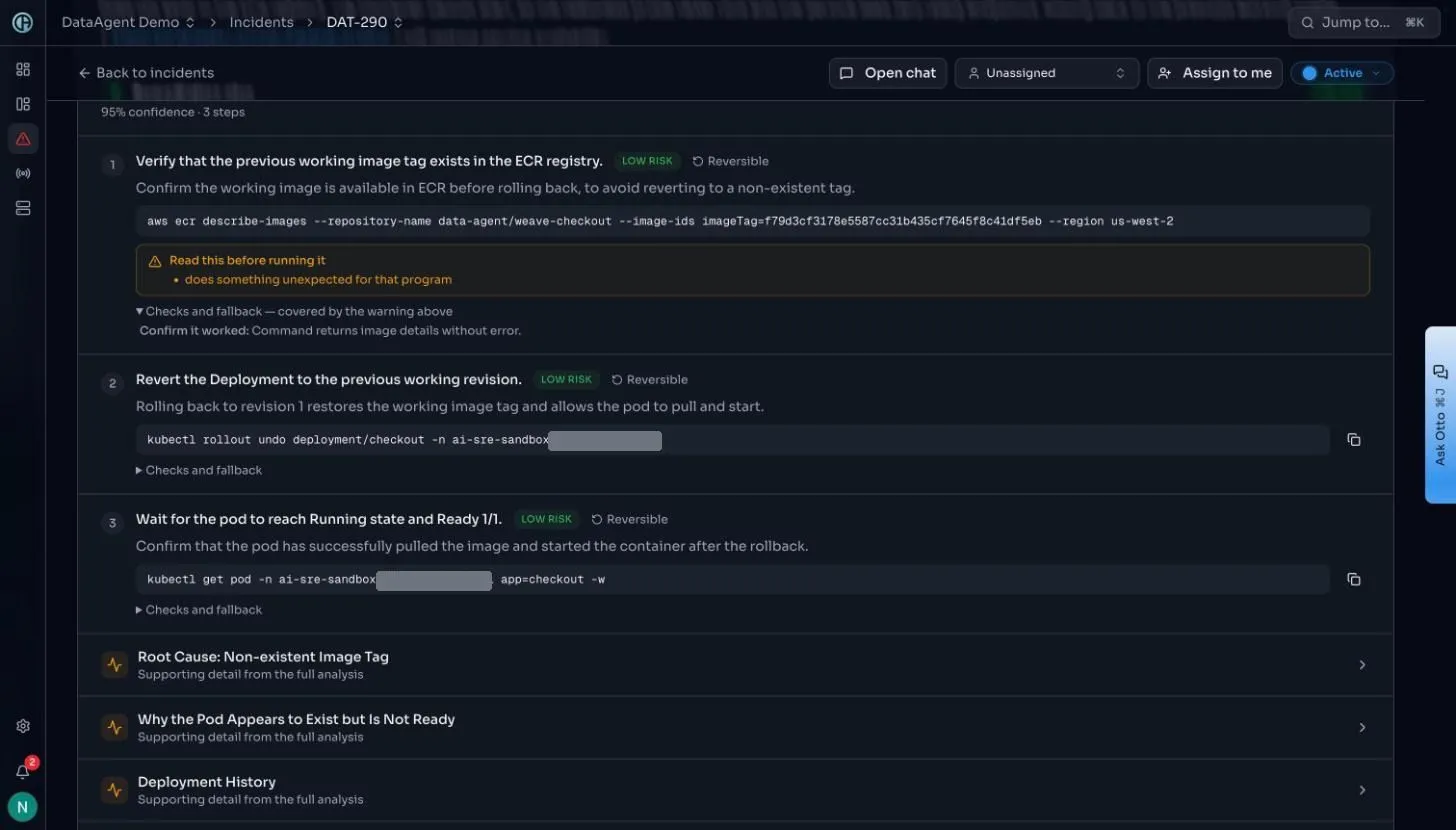
Step one does not change anything. It checks the image it is about to roll back to actually exists in the registry, so the fix cannot replace one broken tag with another. Step two is the single command that fixes it. Step three waits and confirms. And there is a warning on step one flagging a command worth reading before running.
Where to look
- Step 1
- Read-only. Confirms the rollback target exists.
- Step 2
- One command, reversible, named revision.
- Step 3
- Waits for Ready 1/1 before calling it done.
The route to production
Everything up to here was read-only. This is the only part that writes, and it runs entirely on your side.
- Stage 01
One: The plan exists
Written by the hub, which never applies it. It sits there and does nothing.
- Stage 02
Two: It becomes a pull request
In your repository, under your branch protection.
- Stage 03
Three: A person approves
A review and a merge, in their name. The merge is the trigger.
- Stage 04
Four: Your runner applies it
The DataAgent CLI runs pre-flight, action, verify, report. Your credentials throughout.
Screen 6: The plan, as a pull request (git)
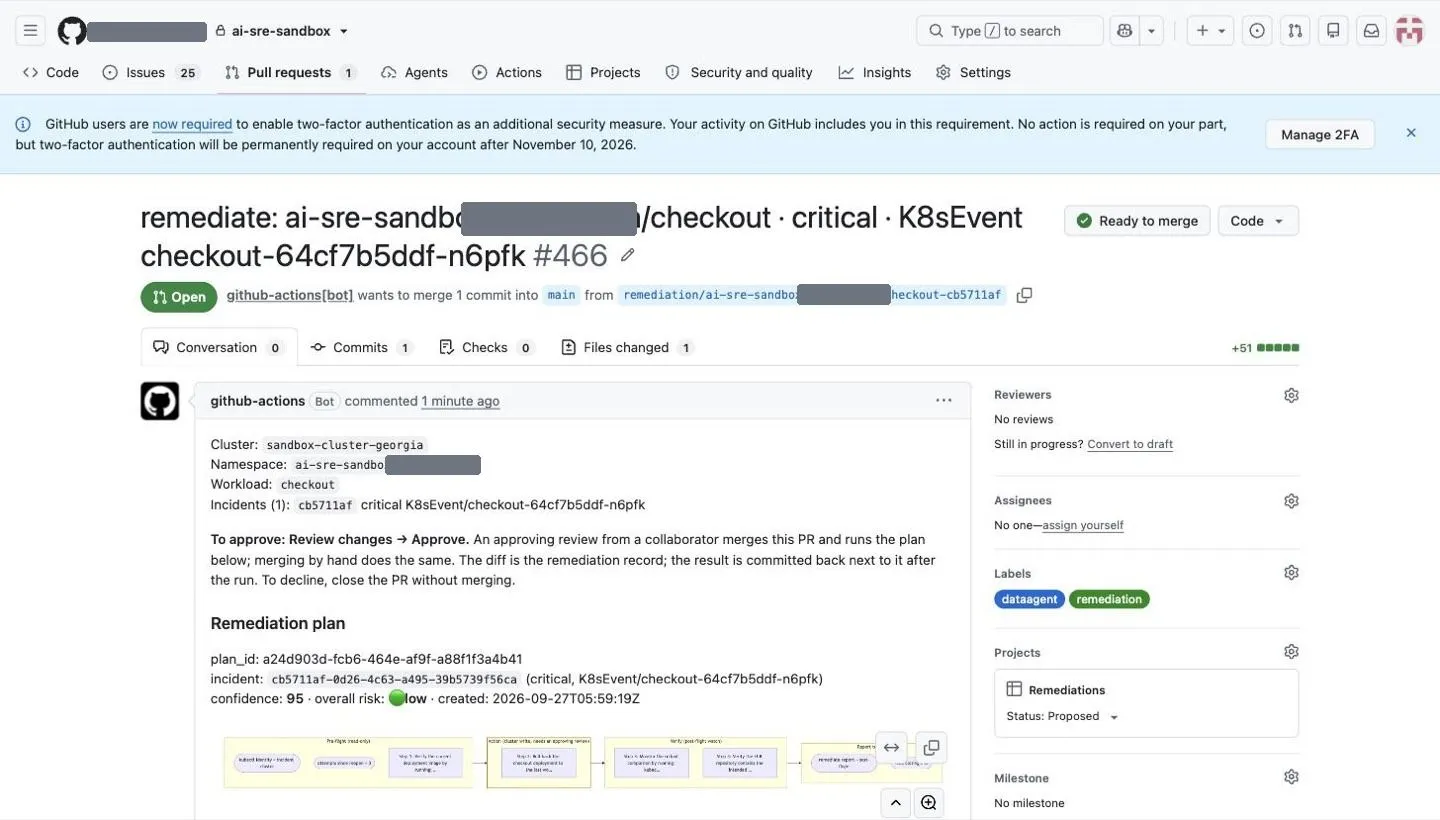
Everything a change-management process asks for is on one page: what will run, against what, why, and how risky it is. The files changed are the remediation record itself.
Screen 7: Approved, and running (git)
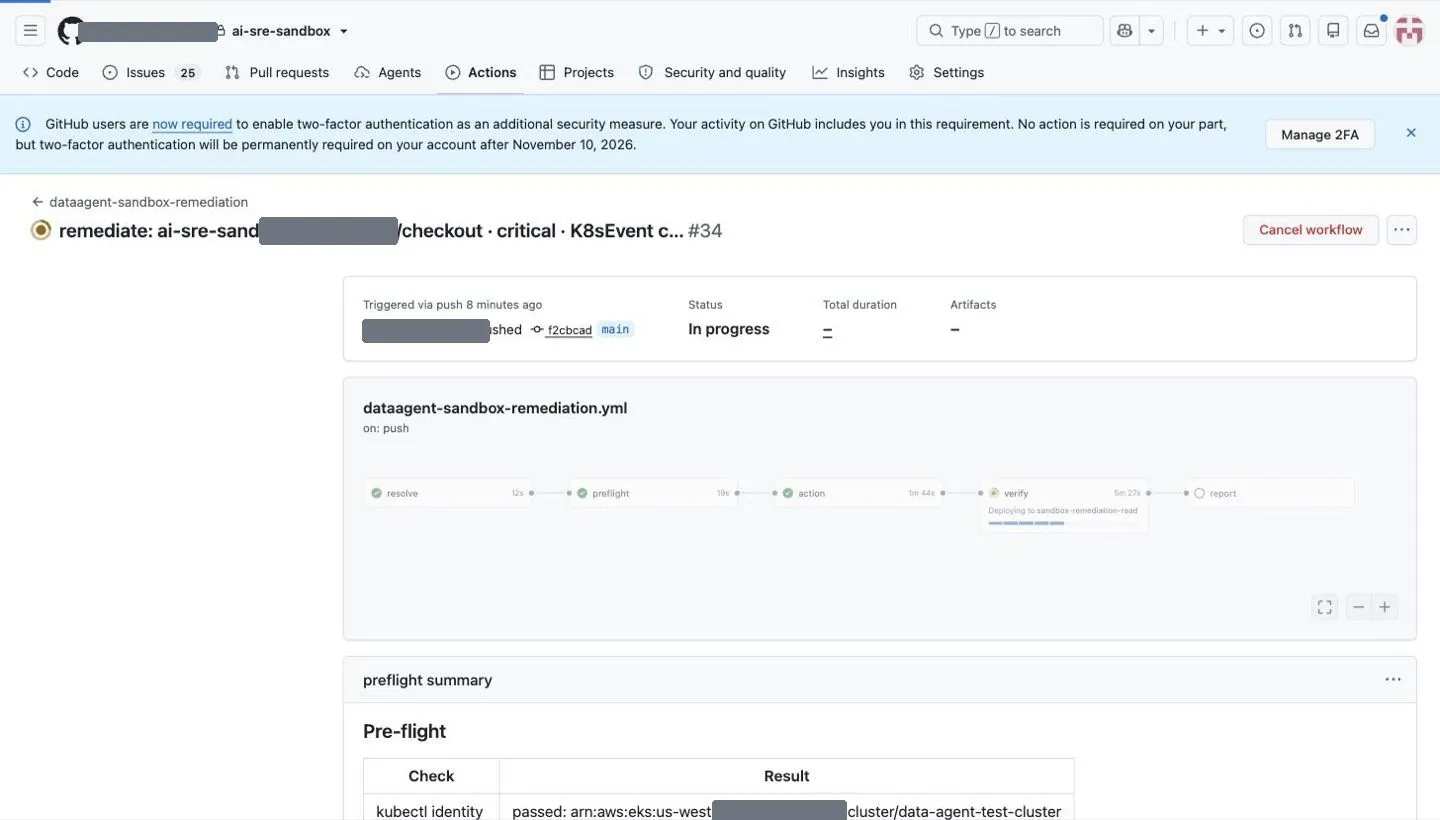
Pre-flight confirms it is talking to the cluster the plan named and that the plan is still the one that was approved. Only then does the action job run, and it is the only one with write access. Verify waits for the rollout before report closes the loop.
Screen 8: And reported back (git)
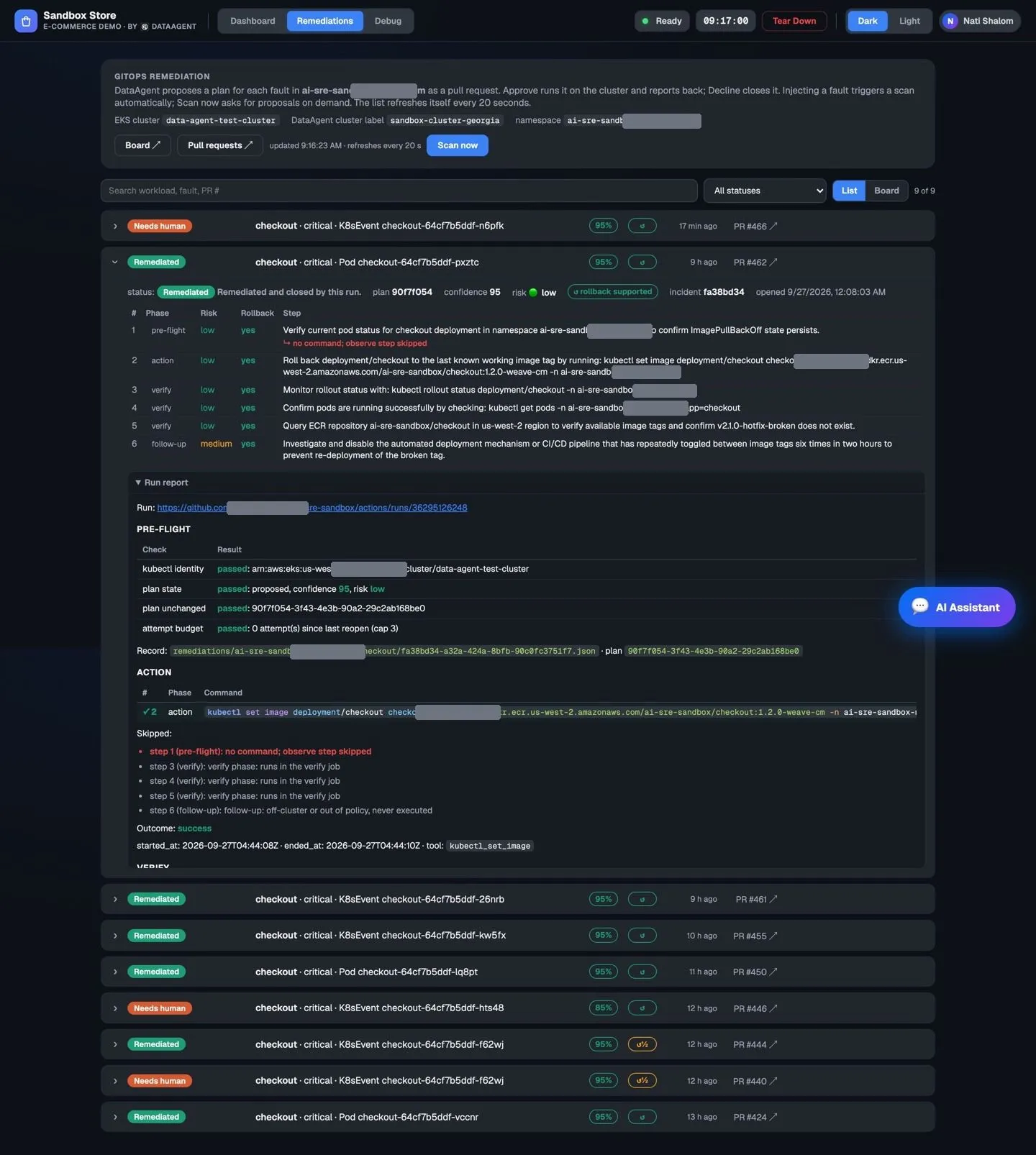
Nothing is declared fixed because a command exited zero. It is fixed because the rollout was checked afterwards and the result was reported back, so the incident closes on the product's side too and not only on yours.
↑ Back to topThe interesting runs are the ones that stop
A demo where everything works proves very little. Every row below is a real outcome, not a hypothetical, and two of them happened while this guide was being written.
| What happens | Why | What the system does |
|---|---|---|
| The analysis declares a gap | A data source could not be read. | It says so at the top of the analysis and names the tools it did use, rather than filling the gap silently. This is visible on screen 2. |
| Pre-flight refuses to run | The cluster the runner is pointed at does not clearly match the cluster in the incident. | The run stops before the action job and says why. A matching workload name is not treated as proof. |
| Handed back to a human | The runner could not reach the cluster. | It stops with the reason. It does not retry blindly and it does not report success. |
| A step is refused by policy | A plan step used a verb outside the allowlist. | Refused, with the reason in the report. Observe steps are skipped, never improvised into something executable. |
| No plan at all | The analysis did not reach a confident, reversible course of action. | Nothing is proposed. There is no row to approve, which is correct when the honest answer is that it does not know. |
A system that cannot refuse is not safe, it is lucky.↑ Back to top
What it takes to run this yourself
Three pieces, and two of them you already have.
- Stage 01
One: Otto, our agent in the cluster
About 512MB, read-only, no model weights, nothing stored locally. Reads events, rollout history and the registry.
- Stage 02
Two: A repository and a workflow
Turns a plan into a pull request and a merge into a run. Yours.
- Stage 03
Three: A runner beside the cluster
Runs approved plans with the DataAgent CLI and your credentials. The vendor holds none.
Where to start
Start read-only. Put Otto on a real cluster. Setup takes an afternoon and is reversible. Then let it write analyses for a few weeks with the execution side disconnected entirely, and read what it produced against the incidents you actually had. That answers the only question that matters before anything gets an approval button: are the plans any good.
Connect the pipeline after that, for one workload first. The approval step is not a formality. It stays for each fault class until that class has earned autonomy on a verified record. Even after that, write access never goes to DataAgent. Experience changes whether a plan waits for a person, never who holds the key.
↑ Back to top